Facial Rigging Basics Every Character Artist Should Know
Creating expressive and believable characters is one of the most exciting parts of 3D character art. While modeling and texturing define how a character looks, facial rigging is what gives it personality and emotion. A properly rigged face allows characters to convincingly smile, blink, speak, and react naturally, making them feel alive on screen.
For many beginners, facial rigging can seem highly technical and intimidating. However, understanding the core concepts makes the process much easier to approach. Once you learn how facial systems are built and how expressions are controlled, creating functional and animator-friendly rigs becomes far more manageable.
In this guide, we will explore the essential facial rigging basics every character artist should know, from topology and deformation to controls and workflow fundamentals.
What Is Facial Rigging?
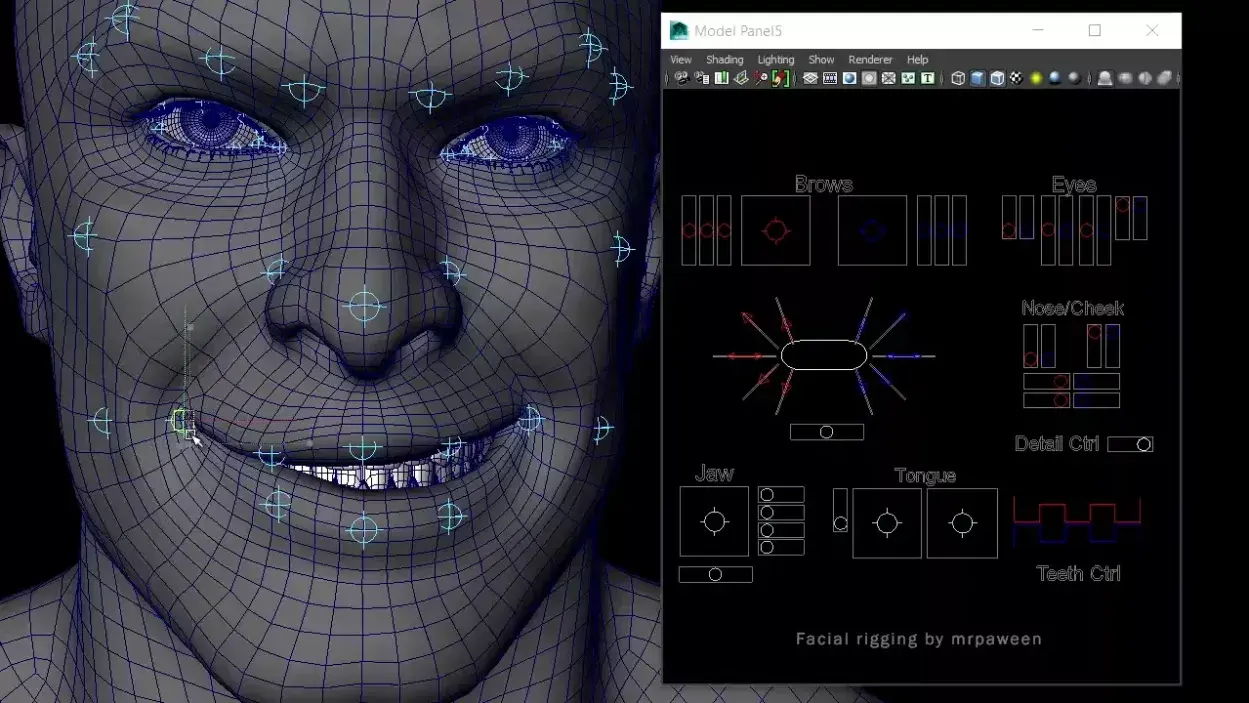
Facial rigging is the process of creating a control system that allows a 3D character’s face to move and express emotions. These controls help animators manipulate facial features such as the eyes, eyebrows, cheeks, mouth, jaw, and lips.
A facial rig acts like the “muscle system” of a digital character. Instead of manually editing the mesh frame by frame, animators use rig controls to create natural facial expressions and speech movements efficiently.
Facial rigs are widely used in:
- Animated movies
- Video games
- VFX production
- Virtual influencers
- Motion capture projects
- Cinematic storytelling
- MetaHuman and real-time animation pipelines
Original Creator – https://www.meshy.ai/blog/what-is-rigging-in-animation
Why Facial Rigging Is Important
Facial expressions are one of the strongest forms of communication in character animation. Audiences naturally focus on the face to understand emotion, reaction, and personality. Because of this, facial animation plays a major role in storytelling.
Strong facial rigging helps:
- create emotional connection with viewers
- support believable lip-sync animation
- improve cinematic performances
- add realism to character movement
- speed up animation workflows
Even small facial details can dramatically affect how a character feels on screen. A slight eyebrow raise, lip compression, or eye squint can completely change the emotional tone of a scene.
Without proper facial rigging, even highly detailed characters can appear stiff or emotionally disconnected.
Facial Rigging Fundamentals
Before creating advanced facial controls and expressions, every character artist should understand the basics of facial rigging. These fundamentals help build cleaner deformations, more believable expressions, and production-ready character rigs.
Facial Topology Is Everything
Good facial rigging starts with good topology. Even the best rig cannot deform properly if the character model has messy edge flow.
Facial topology refers to how polygons are arranged across the face. Clean edge loops help the mesh bend naturally during expressions like smiling, blinking, or talking.
Important areas that need proper edge flow include:
- Around the eyes
- Around the mouth
- Cheeks
- Jawline
- Nasolabial folds
Most professional artists design topology based on real facial muscle movement. This helps maintain cleaner mesh deformation during movement.
Deformation Quality Matters More Than Complexity
In facial rigging, clean deformation is more important than complex setups. A simple rig that deforms correctly will always outperform a complicated rig that breaks during animation.
Strong facial deformation focuses on:
- Smooth transitions between facial poses
- Stable volume during movement
- Clean bending around joints and muscles
- Consistent behavior across all expressions
Production studios prioritize reliability and animation quality over unnecessary technical complexity.
Note: Good deformation is closely tied to animation principles, as it determines how naturally a character responds to motion and expressive performance.
Facial Anatomy Improves Rig Quality
You do not need to become a medical expert, but understanding basic facial anatomy can dramatically improve your rigging skills.
Real facial expressions are driven by muscles working together. When artists understand how these muscles affect the skin, they can build more natural-looking rigs.
Some important facial areas to study include:
- Eyebrow movement
- Lip compression
- Cheek elevation
- Jaw rotation
- Eye squashing during blinks
Studying real human expressions is one of the fastest ways to improve your facial rigging knowledge.
Facial Controls Should Feel Natural

Animators need controls that are easy to understand and efficient to use.
Good facial controls should:
- Be clearly organized
- Move predictably
- Avoid clutter
- Match natural facial movement
For example:
- Moving an eyebrow controller upward should create a natural brow raise.
- Mouth controls should allow smooth lip shaping for dialogue.
The easier the controls are to use, the faster animators can create expressive performances.
Original Creator – https://www.metahuman.com/
Skinning and Weight Painting Are Important
Skinning and weight painting play a major role in how a facial rig deforms during animation. Skinning determines how the mesh responds to joints and controls, while weight painting manages how much influence each area receives during movement.
Proper weight distribution helps avoid problems such as collapsing geometry, unnatural stretching, sharp deformation, and volume loss. Smooth transitions are especially important around flexible facial areas like the mouth, cheeks, and eyelids to maintain stable and believable expressions throughout animation.
Discover how rigging powers modern animation pipelines in our detailed guide on what is rigging in animation? Why it’s the backbone of modern animation pipelines
Blendshapes and Joints in Facial Rigging
Modern facial rigs often combine multiple systems together. Two of the most common methods are joints and blendshapes.
- Joint-Based Facial Rigs: Joint-based facial rigs use bones and joints to control facial movement. They are commonly used in video games and real-time animation because they are lightweight and efficient. These rigs are often used for jaw movement, eye rotation, eyelid motion, and eyebrow controls while maintaining stable performance.
- Blendshape Facial Rigs: Blendshape facial rigs use sculpted facial poses to create expressions and speech animation. Artists build shapes like smiles, frowns, blinks, and phoneme poses, which are blended together during animation. This method allows detailed and expressive facial performance, especially in films and cinematic character animation.
Tip: Facial rigging becomes even more powerful when you understand how to use Maya’s animation tools effectively for real character performance.
Learn the Basics of FACS
The Facial Action Coding System (FACS) breaks facial expressions into individual muscle-based movements called Action Units.
Many professional facial rigs and motion-capture systems are influenced by FACS because it helps artists create anatomically accurate expressions.
Learning basic FACS helps artists:
- understand how expressions form
- improve blendshape creation
- build realistic facial poses
- create stronger emotional performances
Even a basic understanding of FACS can significantly improve facial rigging quality and expression design.
Expression readability becomes especially important during close-up shots and dialogue scenes where audiences focus heavily on facial performance.
Related Articles:
3D Artist Roadmap: Beginner to Professional
Original Creator – http://www.chrisevans3d.com/pub_blog/multi-resolution-facial-rigging/
Facial Rigging Workflow Explained
Facial rigging usually follows a structured workflow to ensure stable and production-ready results.
Step 1: Preparing the Character
Artists first finalize the character model and clean the topology. This stage creates the foundation for proper deformation.
Step 2: Building the Facial Structure
Joints and controls are placed in important facial areas to establish movement systems.
Step 3: Creating Expressions
Artists build facial poses such as:
- Smiles
- Blinks
- Frowns
- Lip-sync shapes
These expressions become part of the animation system.
Step 4: Testing Deformation
The rig is tested under different expressions and dialogue poses to ensure movement remains stable and visually clean.
Step 5: Refinement and Optimization
The final stage focuses on improving usability, cleaning controls, and ensuring the rig works efficiently during animation.
Want to Learn Facial Rigging the Production Way?
If you truly want to become a professional character artist, learning facial rigging the production way is a valuable skill. In real studios, facial rigs are not just built for learning; they are designed for performance, efficiency, and production-ready animation workflows.
At M3DS Academy, we help aspiring artists move beyond basic facial rigging tutorials and step into real production pipelines through our 3D Rigging Course, which includes both body and facial rigging training. We focus on practical, production-oriented learning rather than just software tools.
Our approach focuses on building strong fundamentals first, so you understand why each part of the rig matters before moving into advanced systems.
Join M3DS Academy and kickstart your career in professional rigging today.